Finding the best AI image generator in 2026 is not as simple as picking the tool that makes the prettiest image. You must match the tool to the task. Speed, control, the accuracy of text, and the consistency of a brand all matter. This guide compares tools for images by use to help creators find the most value.
How Users Rank AI Image Generation Tools
The table below tracks how models rank across categories such as photorealism, text rendering, and product imagery.
Best AI image generators for speed and templates
Social media creators work fast. You do not have time for complex prompts or extra software, which is why AI image generation tools for this category need to do more than produce a nice image.
ChatGPT (GPT Image 2)
The Creator Use Case: Good choice for iterative design through conversation. The system allows for multi turn editing, where you can ask for changes without starting over. It generates production ready assets like social graphics and infographics with 4K resolution support.
Pricing: Included in ChatGPT Plus for $20 monthly. A free tier is available with daily limits.
Key Feature: Conversational Reasoning. The model thinks about the composition and text before rendering, allowing for complex layouts and perfect spelling.
Pros: Excellent at maintaining context across multiple edits.
Generates up to eight consistent images in a single thinking session.
Cons: Can be slower than Flash models during peak hours.
The default artistic style can feel repetitive without specific prompt guidance.
Gemini (Nano Banana 2)
The Creator Use Case: This tool uses a 3D aware model to handle the physics of light and the weight of objects in a scene. The system specializes in the rendering of small text and structured layouts, making it useful for data-heavy visuals.
Pricing: Free for basic use in the Gemini app. Pro tiers start at $19.99 monthly for 4K output and deeper reasoning.
Key Feature: Real-World Grounding. The model uses Google Search to reference real landmarks, products, and lighting conditions for maximum accuracy.
Pros: Extremely fast generation speed at Flash tier levels.
Maintains character resemblance for up to five subjects across a workflow.
Cons: Strict safety filters can sometimes block creative or abstract prompts.
Advanced 4K resolution is locked behind the Pro subscription.
Canva Magic Media
Canva Magic Media can act as a centralized design hub for creators. It has AI image generation tools within its drag-and-drop editor Instead of functioning as a standalone art generator, it allows you to incorporate AI assets into pre-sets, presentations, and social media formats.
The Creator Use Case: It is best for influencers or small business owners who need to drop a new image into an existing Instagram or TikTok template.
Pricing: Includes a limited free tier. Canva Pro starts at $12.99 monthly for full access to Magic Studio.
Key Feature: Brand Hub Integration. This allows the AI to apply your specific colors, logos, and fonts to any image it creates.
Pros: Native integration with millions of templates.
Simplifies the move from generating images to designing graphics.
Cons: Lower artistic control than dedicated art tools.
Struggles with prompts that are very complex or abstract.
Ideogram 3.0
Ideogram 3.0 is a specialized engine for graphic design and typography. It uses dual track architecture to separate aesthetic composition from a dedicated layer for text rendering. This allows the model to produce accurate, stylized text as native graphical elements within a 3D scene.
The Creator Use Case: This tool is for creators who need accurate text in images. It is the best option for YouTube thumbnails, quote cards for Instagram, or posters where spelling must be perfect.
Pricing: Offers 10 free credits daily. Paid plans start at $8 monthly for faster processing and private generations.
Key Feature: Precise Typography Engine. Ideogram 3.0 leads the industry by showing long sentences and complex fonts without spelling errors.
Pros: Unrivaled accuracy for text and logos.
Magic Prompts expand simple ideas into detailed descriptions.
Cons: Photorealism is good but behind specialized tools like FLUX.
The free tier is limited during peak hours.
Promeo
Promeo is an automated marketing production tool. It uses built in AI to convert text prompts into advertisement layouts. These layouts focus on the order of what people see first and where to put text that asks viewers to act.
The platform chooses colors and fonts based on the goal of the marketing, such as launching a product or sales for a season.
The Creator Use Case: This is an ad generator. Creators who run paid social campaigns or sell digital products use Promeo to turn text into ads with captions and hashtags.
Pricing: Free version available with watermarks. Premium access starts at $6.99 monthly.
Key Feature: AI Ad Intent. The tool analyzes your prompt to see if you are selling a product or sharing a tip, then adjusts the layout.
Pros: Automates captions and hashtags with the visual.
Optimized for vertical video like Reels and Shorts.
Cons: Less flexibility for pure art or creative tests.
The style can feel too commercial for personal branding.
Asset design and enhancement
These tools prioritize the quality of the final image. They provide ample control over the structure and the resolution of a file.
LTX Studio
LTX Studio is an AI production platform built for agencies, brand studios, and creative teams that need consistent, brand-safe assets at scale. It covers the full production workflow in one environment: scripting, storyboarding, shot generation, and editing, all powered by the LTX-2.3 model, so visual identity holds across an entire project rather than a single isolated clip.
The Creator Use Case: It is best for creative directors and production teams who need to move from brief to final video without bouncing between multiple tools or losing brand consistency between shots.
Pricing: Free plan available for individuals. Team and enterprise plans available.
Key Feature: Teams can train the platform on their own characters, brand styles, and visual environments so every generation stays on-brand without re-describing assets each time.
Pros: Full production pipeline from script to export in a single workspace.
Consistent visual identity across multi-shot and multi-scene projects.
Cons: Built for teams with a production workflow; less suited to one-off single clip generation.
Requires more setup than consumer-facing tools for casual creators.
Recraft (V4)
The Creator Use Case: This is a tool for designers who need icons, logos, and brand graphics. It allows you to set a specific color palette and a style for a project.
Pricing: Includes a free tier with 50 daily credits. Paid plans start at $10 monthly for commercial rights and vector exports.
Key Feature: Native Vector Generation. Recraft creates true SVG files that you can resize without a loss of quality.
Pros: Control over the style of a brand.
Generates sets of icons with a consistent look.
Cons: The interface takes time to learn.
Raster images can lack the texture of artistic models.
Krea AI
The Creator Use Case: Use this tool for the rapid testing of ideas. It provides a split-screen interface where you draw basic shapes on the left to dictate the composition of the high fidelity render on the right.
Pricing: Offers a free tier with daily limits. The Basic plan starts at $9 monthly for a license for commercial use.
Key Feature: Real time Canvas. Krea renders a high quality image in milliseconds as you move a brush or change a prompt.
Pros: Instant feedback allows for fast changes to a concept.
Includes a tool for illusions that hides shapes inside organic scenes.
Cons: Generation speed can lead to a loss of fine detail.
Credits can run out quickly during long sessions.
Magnific AI
The Creator Use Case: This is a tool for creators who have an image of low quality that they need to turn into a 4K or 8K file for a portfolio or print. It uses a slider for creativity to decide how much new detail the AI should invent.
Pricing: No free tier. Plans start at $39 monthly for a set number of upscales.
Key Feature: Generative Upscaling. Magnific adds new textures and details that were not in the original file.
Pros: Exceptional at adding realism to skin, fabric, and nature.
Fixes errors in anatomy or lighting from other tools.
Cons: High price compared to tools that do many tasks.
High creativity settings can change the face of a subject too much.
Playground
The Creator Use Case: This is a tool for creators who need to combine several generated images into one scene on a single board. It allows you to generate a subject and then use brushes to add or remove parts of the image. The system uses a model that understands how to blend new pixels into an existing shot.
Pricing: Free for up to 50 images a day. Pro plans start at $12 monthly for higher limits and faster generation.
Key Feature: Mixed Image Editing. It allows you to generate new images and edit them using brushes and masks on one infinite canvas.
Pros: Excellent for keeping multiple assets in one workspace.
Provides high control over how elements overlap in a scene.
Cons: The canvas layout can be confusing for simple tasks.
Certain filters can feel repetitive across different prompts.
Digital art generators
As for high end digital art, the best AI image generator in 2026 is the one that gives you both quality and control. These tools are built for polished visuals, such as hero images, thumbnails, concept art, and detailed illustrations.
Midjourney (V7)
Midjourney is an art generation model that uses a process of diffusion. It focuses on the use of light, texture, and artistic style. The system uses a set of data from many forms of art to create images that look like paintings or digital art. It runs on a platform for a community where users share prompts and work. The model allows for many levels of style and changes to a single concept.
The Creator Use Case: Use Midjourney when you need a painterly look that other tools cannot copy. It is perfect for stylized thumbnails and unique brand illustrations.
Pricing: No free tier. Basic plans start at $10 monthly.
Key Feature: Personalization Model. Midjourney V7 learns your preferences and prioritizes styles and colors you like in new work.
Pros: Most sophisticated lighting and texture engine.
Massive community to learn prompts from top artists.
Cons: Relies on Discord, though the web version is improving.
Can be hard to get exact results due to its artistic bias.
FLUX.2 Pro
FLUX.2 Pro uses flow-matching architecture to produce textures in anatomical detail. The model specializes in the rendering of human features and the physics of light on surfaces. Because the code is open, the system allows training on new datasets to match specific assets or subjects.
The Creator Use Case: Use FLUX.2 Pro when you need an image that looks like a real photo, especially for human hands and faces.
Pricing: Pay per image on various platforms or through a monthly subscription.
Key Feature: Anatomical Precision. FLUX.2 solves the problem of showing five fingers and realistic eye reflections every time.
Pros: Unbeatable realism for portraits and lifestyle photos.
Open source nature allows training the AI to know your face or products.
Cons: Requires a technical setup for the best results.
Lacks the artistic flair of Midjourney.
Leonardo.ai
Leonardo.ai is a digital art generator that uses a system of reference for characters. It uses an engine to map features and keep a face consistent across different scenes.
The system allows users to set rules for lighting and camera view while preserving a subject's traits. It includes a workspace for the manipulation of pixels and tools to increase the size of an image to 4K.
The Creator Use Case: Best for keeping a character the same. Use the Character Lock feature to generate the same face in dozens of places.
Pricing: Free daily tokens. Premium plans start at $10 monthly.
Key Feature: Character Reference Tool. Upload one photo of a character, and the system keeps that face and hair the same in every new image.
Pros: Best user interface for advanced control with sliders.
Built-in tools to upscale images to 4K resolution.
Cons: Feature count can overwhelm beginners.
Some older models on the platform are outdated.
Adobe Firefly
Adobe Firefly uses data from the stock of Adobe and public content to ensure safety for use in business. The engine works inside the bar of tools in Photoshop to change pixels in a way that matches the context.
It analyzes the light, the view of the camera, and the depth of the scene to add or remove elements. The system adds metadata to files to show that the art came from AI.
The Creator Use Case: Use Firefly if you need assets safe for business that will not have copyright issues. It is the best choice for creators working with big brands.
Pricing: Included with Adobe Creative Cloud for $59.99 monthly or $4.99 on its own.
Key Feature: Generative Fill in Photoshop. Firefly is built into Photoshop, allowing you to expand images or change clothes with a brush stroke.
Pros: Trained only on Adobe Stock, making it safe for business use.
Smooth workflow with Illustrator and Premiere Pro.
Cons: Strict creation rules can be annoying for creative projects.
Stays behind Midjourney and FLUX in grit and coolness.
Our AI Image Generator Comparison
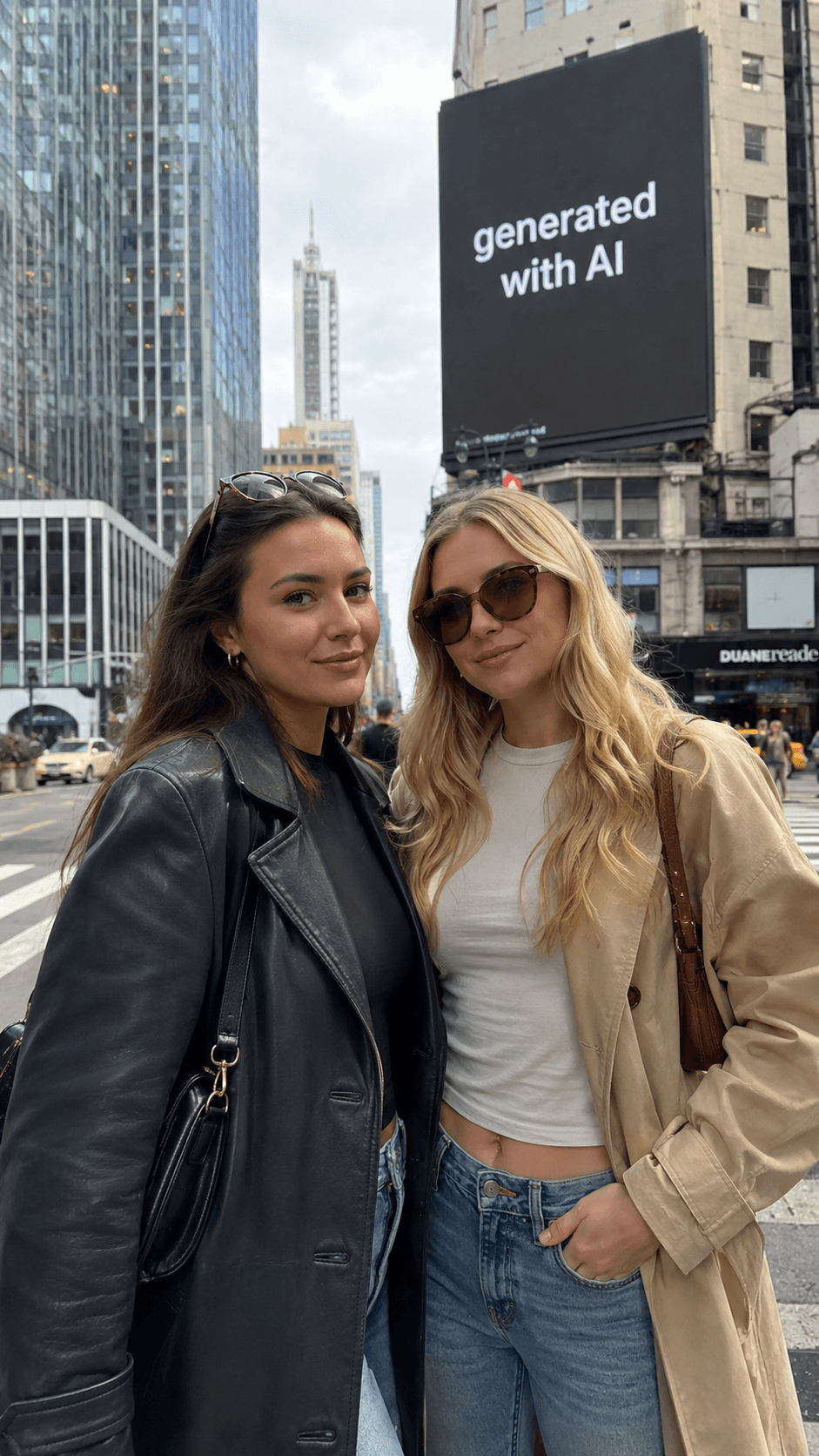
To see how different AI image generators respond to the same creative brief, we tested one prompt across four tools: ChatGPT, Nano Banana 2, Midjourney, and FLUX.
We used the same prompt for each tool:
2 women posing for a picture in the city, the picture is vertical. In the background there are buildings. Have a billboard in the background as well that has the text generated with AI.
Because the prompt includes people, city scenery, vertical framing, and text inside the image, it gives each tool a few different things to solve at once. The images below show how each generator interpreted the same request:
ChatGPT
Nano Banana 2
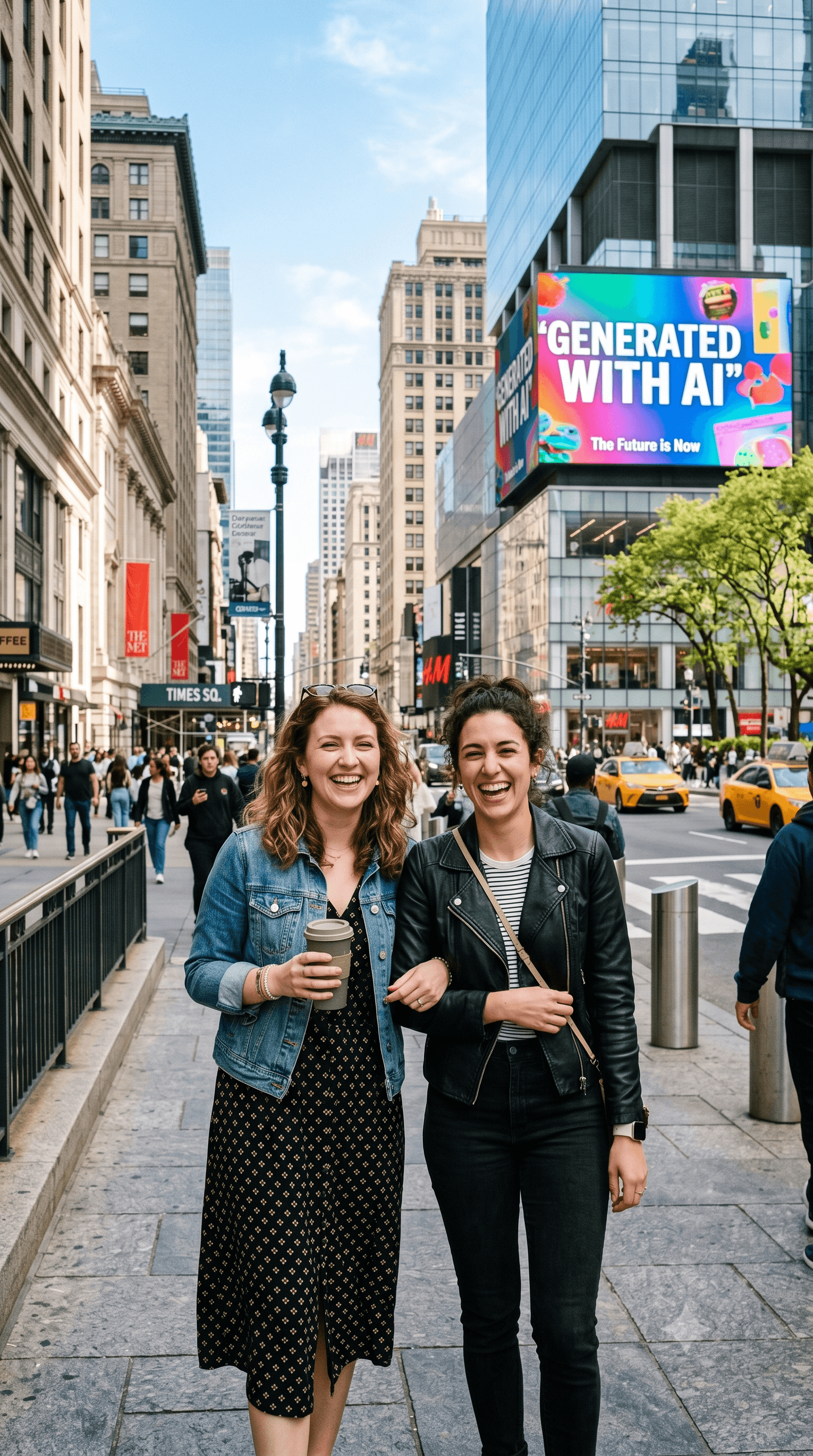
Midjourney
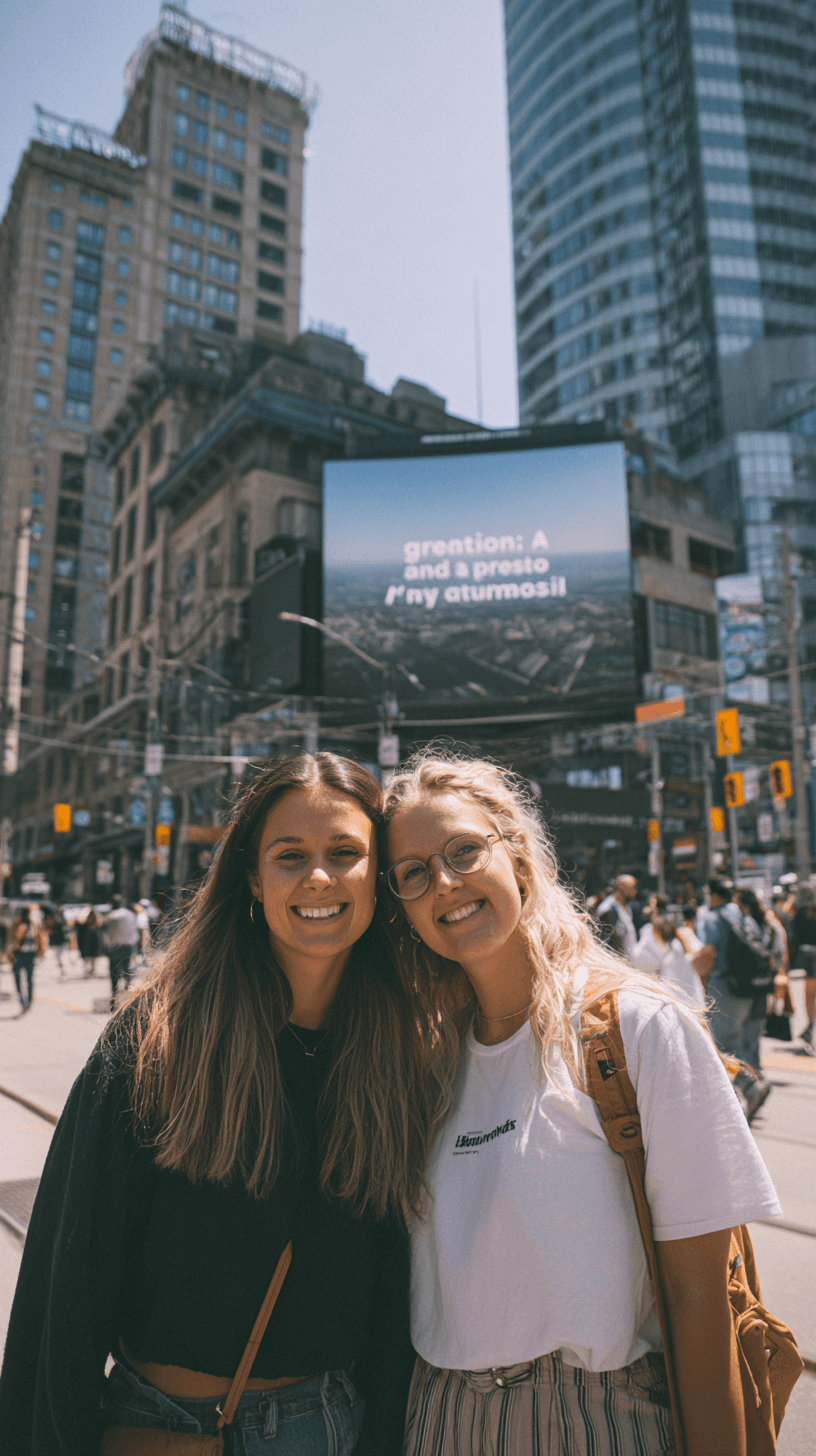
Flux
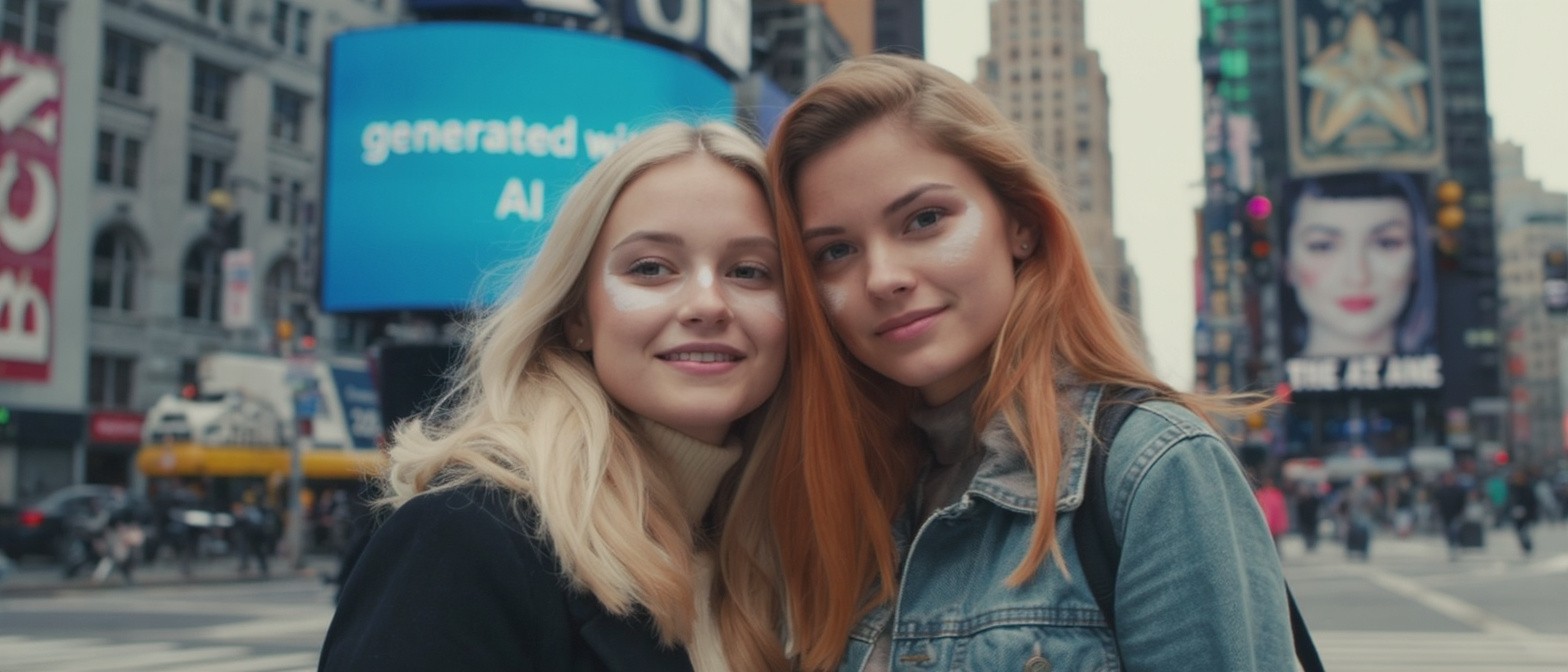
Best Free AI Image Generators 2026
Meta AI: This is the only tool that stays free for all users with no limits.
Canva: Users can access a tier that is free for basic design and generation.
Leonardo.ai: This tool gives tokens every day that reset for new projects.
Ideogram: You get 10 credits every day for work that needs text.
Luma Dream Machine: The plan at no cost includes 30 generations every month.
Promeo: A version for free is available but puts watermarks on the ads.
Runway and Pictory: Both offer trials for free to test the tech before you spend money.
Best Image Generating AI Stack for Creators
Creators often get better results by using different platforms for different tasks. Here is a simple three step workflow for your next visual idea.
Step 1: The Subject and Setting
Start with the main subject. Leonardo.ai works for this task because the feature for the lock of a character keeps a person or mascot consistent across many images. Generate a shot with a background that is clean. Use the tool to upscale the art to sharpen the result.
Step 2: Typography and Layout
Bring the image into Ideogram 3.0 to use as a reference. Add the text for the headline directly into the scene. This tool is useful for the design of letters. It makes the text feel like a part of the image instead of a flat layer placed on top.
Step 3: Professional Polish
Use Magnific AI to refine the final image. This step adds texture and detail to the skin, the fabric, and the setting. It turns the generation into a file of high resolution for a portfolio or for print.

Can you sell AI generated art?
What is the best image generating AI?
How have AI image generators changed since 2024?
Are free AI image generators good enough for professional creators?